

AI Integration Quick Reference
AI Integration Quick Reference
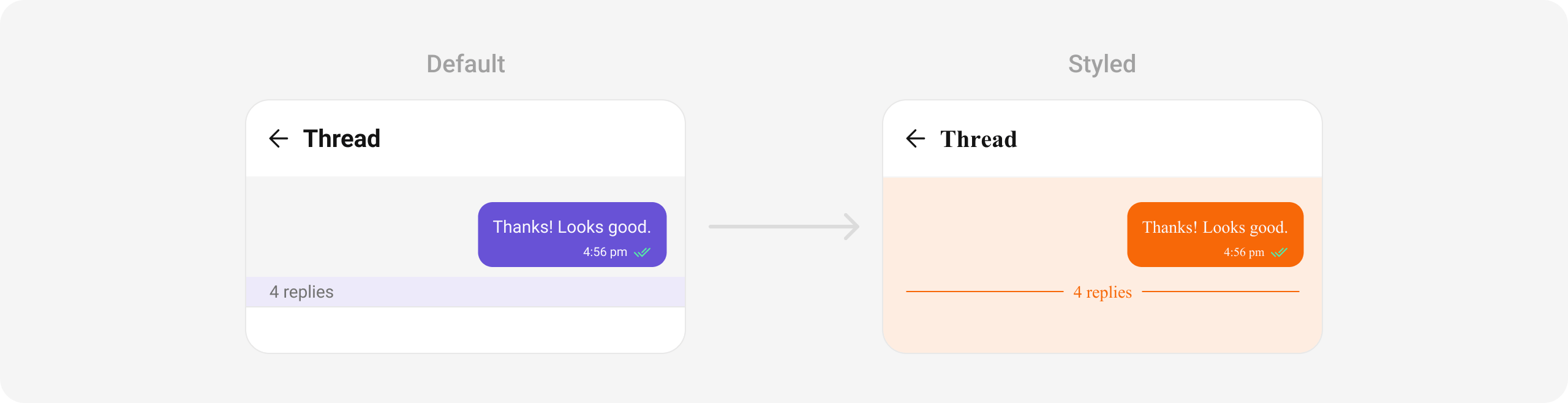
CometChatThreadedHeader displays the parent message of a thread along with reply count and provides the container for threaded message list and composer. It enables organized threaded conversations within a chat.

Where It Fits
CometChatThreadedHeader is used when a user taps “Reply in Thread” on a message. It wraps the parent message display with a CometChatMessageList (filtered by parentMessageId) and CometChatMessageComposer for thread replies.
- Dart
Quick Start
- Dart
- Dart
BaseMessage object as the parent message.
Actions and Events
Navigation (host-owned)
CometChatThreadedHeader renders the parent-message context only — it exposes no onBack or
onError callback. Provide navigation from the screen that hosts it: a pushed route already gets a
back button from its AppBar, so no wiring is required.
- Dart
The thread list and composer each need
parentMessageId and the same user/group target as
the parent chat. Passing parentMessageId alone sends replies to the wrong target.Custom message actions
UsemessageActionView to render your own actions next to the parent message.
- Dart
SDK Events (Real-Time, Automatic)
Functionality
Custom View Slots
Bubble View
Replace the parent message bubble display.CometChatThreadedHeader has no bubbleView parameter of
its own — pass a CometChatMessageTemplate via template and override its bubbleView.
- Dart
Advanced
BLoC Access
The threaded header usesThreadedHeaderBloc internally:
Style
- Dart
Next Steps
Message List
Display messages in a conversation
Message Composer
Compose and send messages
Threaded Messages Guide
Complete threaded messages implementation
Component Styling
Detailed styling reference