> ## Documentation Index
> Fetch the complete documentation index at: https://cometchat-22654f5b-docs-skills-v5-temp.mintlify.site/llms.txt
> Use this file to discover all available pages before exploring further.
# Calling Integration
> Add voice and video calling to your Android UI Kit application using chatuikit-kotlin or chatuikit-compose.
## Overview
This guide walks you through adding voice and video calling capabilities to your Android application using the CometChat UI Kit.
Make sure you've completed the [Getting Started](/ui-kit/android/getting-started) guide before proceeding.
**`enableCalling: true` makes the Calls SDK dependency mandatory — otherwise the app crashes at
launch.** With the flag set, `CometChatUIKit.initFromSettings()` calls `initCometChatCalls()`, which
throws if `com.cometchat:calls-sdk-android` is absent:
```
java.lang.NoClassDefFoundError: Failed resolution of:
Lcom/cometchat/calls/core/CometChatCalls$SessionSettingsBuilder;
at com.cometchat.uikit.core.CometChatUIKit.initCometChatCalls(CometChatUIKit.kt:229)
```
The crash happens in `onCreate`, **before any UI renders** — the flag name gives no hint that a
dependency is implied. Change the flag and the dependency together, or leave `enableCalling` as
`false` in an app that does not use calling.
## Add the Calls SDK
Add the CometChat Calls SDK dependency alongside your chosen UI Kit module:
```kotlin build.gradle.kts theme={null}
dependencies {
implementation("com.cometchat:chatuikit-kotlin-android:6.0.6")
implementation("com.cometchat:calls-sdk-android:5.0.1")
}
```
```kotlin build.gradle.kts theme={null}
dependencies {
implementation("com.cometchat:chatuikit-compose-android:6.0.6")
implementation("com.cometchat:calls-sdk-android:5.0.1")
}
```
After adding this dependency, the Android UI Kit will automatically detect it and activate the calling features.
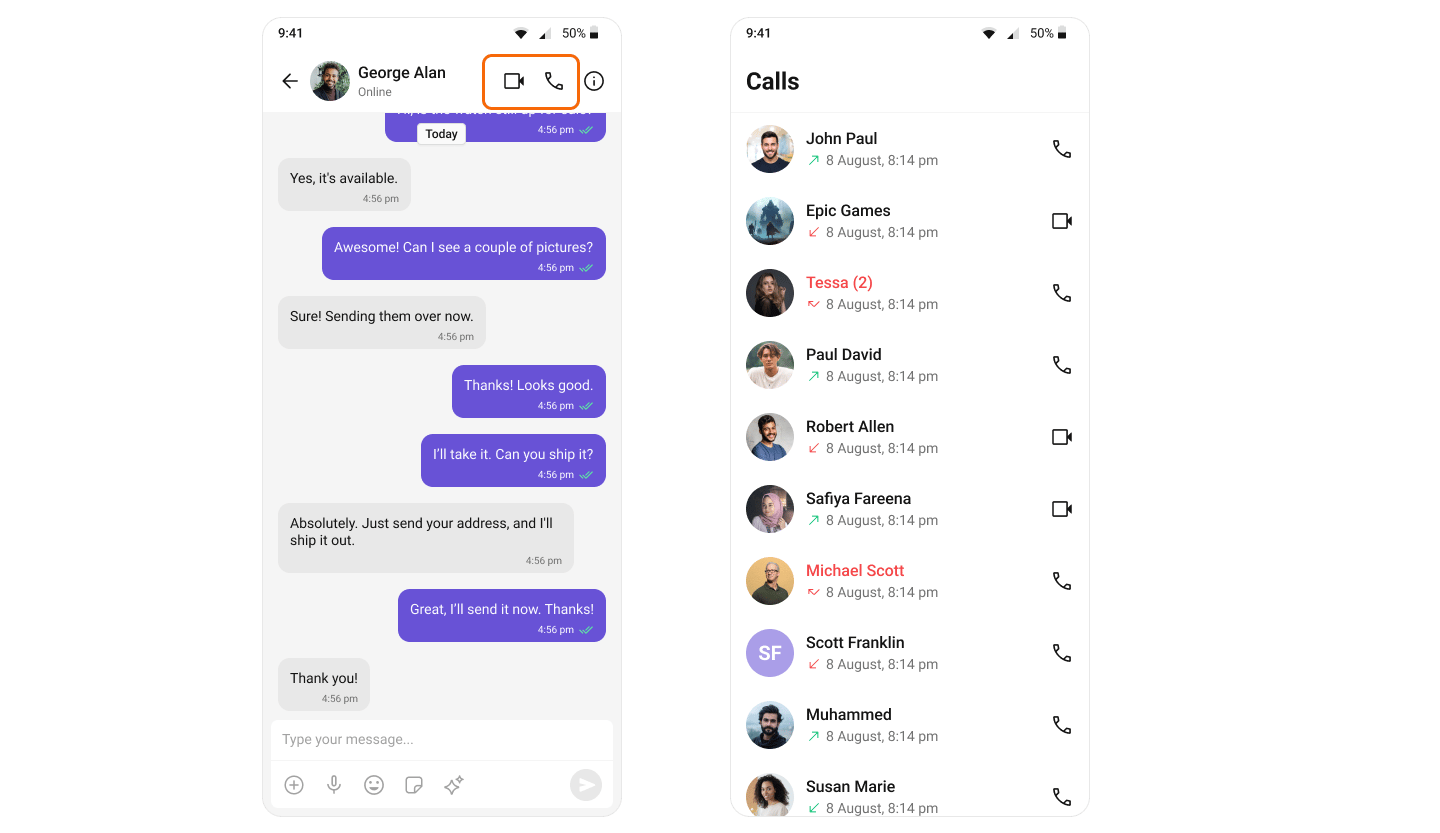
Once calling is active, the voice and video call buttons render in the [MessageHeader](/ui-kit/android/message-header):
The call buttons appear automatically — `CometChatMessageHeader` detects that calling is enabled, so no extra code is needed.
The `CometChatMessageHeader` composable hides the call buttons by default (`hideVoiceCallButton` and `hideVideoCallButton` both default to `true`). Show them explicitly:
```kotlin theme={null}
CometChatMessageHeader(
user = user,
hideVoiceCallButton = false,
hideVideoCallButton = false
)
```
**Enabling calling in an app that already has logged-in users requires a re-login.** `CometChatUIKit.login()` short-circuits when the same uid already has a persisted session — it returns `onSuccess` without logging the Calls SDK in, so the Calls SDK has no auth token and `CometChatCallLogs` shows a silent error state (logcat: `User auth token cannot be null`). After calling is first enabled, log out and log in again (`CometChatUIKit.logout(...)` then `CometChatUIKit.login(...)`), and wire `onError` on `CometChatCallLogs` during development so this failure is visible.
 ## Set Up Call Listener
To receive incoming calls globally in your app, add a `CallListener` before initializing the CometChat UI Kit. We recommend creating a custom Application class:
```kotlin theme={null}
class BaseApplication : Application() {
companion object {
private val LISTENER_ID = "${BaseApplication::class.java.simpleName}${System.currentTimeMillis()}"
}
override fun onCreate() {
super.onCreate()
CometChat.addCallListener(LISTENER_ID, object : CometChat.CallListener {
override fun onIncomingCallReceived(call: Call) {
// Get the current activity context
val currentActivity = getCurrentActivity() // Implement this method
currentActivity?.let {
val incomingCallView = CometChatIncomingCall(it)
incomingCallView.call = call
incomingCallView.fitsSystemWindows = true
incomingCallView.onError = OnError { exception ->
// Handle errors
}
// Display the component (e.g., as dialog or full-screen overlay)
}
}
override fun onOutgoingCallAccepted(call: Call) {
// Handle accepted outgoing call
}
override fun onOutgoingCallRejected(call: Call) {
// Handle rejected outgoing call
}
override fun onIncomingCallCancelled(call: Call) {
// Handle cancelled incoming call
}
})
}
}
```
```kotlin theme={null}
class BaseApplication : Application() {
companion object {
private val LISTENER_ID = "${BaseApplication::class.java.simpleName}${System.currentTimeMillis()}"
}
override fun onCreate() {
super.onCreate()
CometChat.addCallListener(LISTENER_ID, object : CometChat.CallListener {
override fun onIncomingCallReceived(call: Call) {
CometChatCallActivity.launchIncomingCallScreen(this@BaseApplication, call, null)
// Pass null or IncomingCallConfiguration if need to configure CometChatIncomingCall component
}
override fun onOutgoingCallAccepted(call: Call) {
// Handle accepted outgoing call
}
override fun onOutgoingCallRejected(call: Call) {
// Handle rejected outgoing call
}
override fun onIncomingCallCancelled(call: Call) {
// Handle cancelled incoming call
}
})
}
}
```
## Set Up Call Listener
To receive incoming calls globally in your app, add a `CallListener` before initializing the CometChat UI Kit. We recommend creating a custom Application class:
```kotlin theme={null}
class BaseApplication : Application() {
companion object {
private val LISTENER_ID = "${BaseApplication::class.java.simpleName}${System.currentTimeMillis()}"
}
override fun onCreate() {
super.onCreate()
CometChat.addCallListener(LISTENER_ID, object : CometChat.CallListener {
override fun onIncomingCallReceived(call: Call) {
// Get the current activity context
val currentActivity = getCurrentActivity() // Implement this method
currentActivity?.let {
val incomingCallView = CometChatIncomingCall(it)
incomingCallView.call = call
incomingCallView.fitsSystemWindows = true
incomingCallView.onError = OnError { exception ->
// Handle errors
}
// Display the component (e.g., as dialog or full-screen overlay)
}
}
override fun onOutgoingCallAccepted(call: Call) {
// Handle accepted outgoing call
}
override fun onOutgoingCallRejected(call: Call) {
// Handle rejected outgoing call
}
override fun onIncomingCallCancelled(call: Call) {
// Handle cancelled incoming call
}
})
}
}
```
```kotlin theme={null}
class BaseApplication : Application() {
companion object {
private val LISTENER_ID = "${BaseApplication::class.java.simpleName}${System.currentTimeMillis()}"
}
override fun onCreate() {
super.onCreate()
CometChat.addCallListener(LISTENER_ID, object : CometChat.CallListener {
override fun onIncomingCallReceived(call: Call) {
CometChatCallActivity.launchIncomingCallScreen(this@BaseApplication, call, null)
// Pass null or IncomingCallConfiguration if need to configure CometChatIncomingCall component
}
override fun onOutgoingCallAccepted(call: Call) {
// Handle accepted outgoing call
}
override fun onOutgoingCallRejected(call: Call) {
// Handle rejected outgoing call
}
override fun onIncomingCallCancelled(call: Call) {
// Handle cancelled incoming call
}
})
}
}
```